Webhooks for e-signature: a developer's implementation guide

Alex Shi

Webhooks for esignature give your application real-time notice when a document is sent, viewed, signed, or completed, replacing polling with a push model that reacts in seconds instead of minutes. Once wired up correctly, that same event stream lets you auto-download the final PDF, update a CRM record, or kick off provisioning the moment a signature lands. This guide walks through the checklist, the security rules, and the reliability patterns that keep that pipeline honest, plus a look at how it plays out inside Formable's embedded e-signing API.
TL;DR:
- Webhook setup must include a verified HTTPS endpoint with request signature validation and request response within platform-specific time limits to prevent failures.
- Only subscribe to relevant events like document sent, viewed, signed, completed, and final PDF created, to reduce noise and processing.
- Always process webhook events asynchronously by enqueuing payloads, avoiding inline operations, and applying idempotency checks to handle duplicates reliably.
- Expect at-least-once delivery; implement duplicate detection and store checksums to ensure PDF integrity and prevent repeated downloads.
- Regularly update signing secrets, monitor webhook latency and failures, and use a sandbox for testing to maintain reliability and security in production.
Table of Contents
- Quick implementation checklist for webhooks for esignature
- What is a webhook and which events matter for esignatures?
- How do you set up and register a webhook endpoint?
- How do you verify webhook signatures and block replay attacks?
- Should you process events inline or queue them?
- What delivery guarantees do esignature webhooks offer?
- How should you download and store signed documents?
- How do you debug and monitor webhooks in production?
- How do webhooks work in Formable's embedded e-signing API?
- What Formable's production defaults look like
- Try Formable's embedded e-signing API and sandbox
- Sources
- FAQ
Quick implementation checklist for webhooks for esignature
Before diving into details, work through this sequence. Each step protects against a specific failure mode you'll hit in production.
- Create and expose an HTTPS endpoint, then register it with your provider.
- Verify request signatures and timestamps on every inbound call.
- Reply fast (2xx) and push heavier work to a queue instead of processing inline.
- Use event_id based idempotency, backed by a processed_events table.
- On final or complete events, download the signed PDF and store it with audit metadata.
- Add monitoring, dashboard replay, and a dead-letter queue (DLQ) for anything that fails repeatedly.
Skip any of these and you'll eventually hit duplicate processing, missed PDFs, or a debugging session with no logs to work from.
What is a webhook and which events matter for esignatures?
A webhook is an asynchronous POST request your provider sends to a URL you control whenever something happens on a document. Polling means asking "did anything change yet?" every few seconds; webhooks flip that around so the provider tells you the instant it happens, which saves both latency and your rate limit budget.
Most eSignature platforms emit a fairly consistent set of event types:
- document.sent, when the envelope goes out to a signer
- document.viewed, when a recipient opens it
- document.signed or document.completed, when a signer finishes their part
- finalPdfCreated, when the fully executed PDF is ready
- document.declined or document.expired, for negative outcomes
Payloads generally share a top-level shape: an object type, an event name, a data block with the document details, an id for that specific delivery, and a created timestamp. Subscribing only to the events you actually act on cuts ingestion noise substantially.
How do you set up and register a webhook endpoint?
Setting up your first endpoint is mostly plumbing, but the order matters.
- Spin up a local HTTPS tunnel with a tool like ngrok so your provider can reach your machine during development.
- In production, deploy a real HTTPS endpoint behind your normal TLS setup. Plain HTTP registrations get rejected by most providers outright.
- Register the URL in your provider's developer dashboard or via API, and select which events you want delivered rather than subscribing to everything.
- Send a test document through the flow and confirm the payload arrives, then use the provider's dashboard replay tool to resend it without creating a new document each time.
Expect your provider to require a 2xx response within a tight window, often within a few seconds depending on the platform. Anything slower risks a retry landing on top of your original request.
Pro Tip: Keep a dedicated staging webhook subscription pointed at ngrok even after launch. It turns "let me reproduce this in prod" into a five-minute local repro instead of a support ticket.

How do you verify webhook signatures and block replay attacks?
Signature verification is the one step teams skip when they're in a hurry, and it's the one that costs the most later. Most providers, including Svix-style implementations, sign the raw request body with HMAC SHA-256 using a shared secret, and you recompute that hash on your end before trusting anything in the payload.
The core rules:
- Verify the signature against the raw, unparsed body, not a re-serialized JSON object, since re-serialization changes byte order and breaks the hash.
- Check the timestamp header and reject anything older than a short window, commonly around five minutes, to block replay attacks.
- Rotate signing secrets on a schedule and store them in a secrets manager, never in source control.
- Log every signature failure and alert on repeated failures from the same source, since that pattern often signals a misconfigured endpoint or an actual spoofing attempt.
Some providers use a header named X-Signature-SHA256, others use their own convention, but the verification logic is nearly identical across vendors once you've built it once.
Should you process events inline or queue them?
Respond first, think later. Validate the minimal fields you need (event type, signature, timestamp), return a 200 or 202, and only then hand the full payload to a background worker.
- Publish the raw payload to a broker like SQS, BullMQ, or Celery rather than running downloads, database writes, and third-party API calls inside the HTTP handler itself.
- Use a
processed_eventstable with a unique constraint onevent_idso a duplicate delivery gets silently discarded instead of triggering the same action twice. - Apply exponential backoff with jitter for retries, and route anything that fails a set number of times into a dead-letter queue for manual review.
A narrow ingestion surface that only validates and enqueues tends to be far more reliable than one handler trying to do everything synchronously. The idempotency patterns that payment integrations rely on for duplicate charge protection map almost directly onto esignature event handling.
What delivery guarantees do esignature webhooks offer?
Design for duplicates, because you'll get them. Providers overwhelmingly use at-least-once delivery, which means the same event can arrive twice if a retry fires before your first 2xx response registers.
- Build handlers that detect and discard duplicates rather than trying to prevent them from ever occurring.
- Learn your provider's retry schedule; some retry within seconds, others space attempts over hours before giving up.
- Subscribe specifically to
finalPdfCreatedor an equivalent completion event so you have one reliable trigger for fetching the signed document. - Store a checksum alongside the downloaded PDF so you can confirm the file that landed in storage matches what the provider actually sent.
How should you download and store signed documents?
The download itself belongs in the background worker, never in the webhook's HTTP handler. Trigger the fetch only after the final event has been verified and enqueued.
- On the final or complete event, pull the signed PDF through the provider's document retrieval endpoint from inside the worker process.
- Stream the file directly into object storage rather than buffering it in memory, and write the
event_idand a checksum alongside it. - Preserve immutable audit metadata, including any signature certificate the provider issues, since regulated industries often need that artifact later.
- Set a storage lifecycle policy and access controls up front. Signed contracts tend to outlive the systems that created them.
How do you debug and monitor webhooks in production?
During development, an HTTPS tunnel and your provider's dashboard replay tool cover most debugging needs without touching a real document.
- Log the raw payload alongside its verification result, but redact the signing secret and any personally identifiable fields before those logs hit a shared system.
- Set alerts on a rising DLQ count or a cluster of 4xx and 5xx responses coming back from your own endpoint.
- Keep a short runbook for manual replay so an on-call engineer isn't reverse-engineering the recovery steps at 2am.
- Treat dashboard replay logs as your first stop before assuming an event was never sent at all.
How do webhooks work in Formable's embedded e-signing API?
Formable's embedded signing flow follows the same shape described above, tuned to its own event names and payload fields. You register a webhook endpoint against your Formable account and subscribe to the events you actually need, typically signature completed and a final document ready event equivalent to finalPdfCreated.
A typical sequence looks like this:
- Your app calls Formable's API to create a
SignatureRequestUrland embeds it in your product's signing flow. - The signer completes the document inside your interface.
- Formable fires a webhook to your registered endpoint with the event type and document data.
- Your endpoint verifies the signature, enqueues the payload, and returns immediately.
- A background worker calls Formable's embedded e-signing API to fetch the final PDF and persist it with the document ID, event ID, and timestamp.
Full request and response schemas, along with sandbox credentials, are documented at Docs, including the Node.js and Python integration walkthroughs.
What Formable's production defaults look like
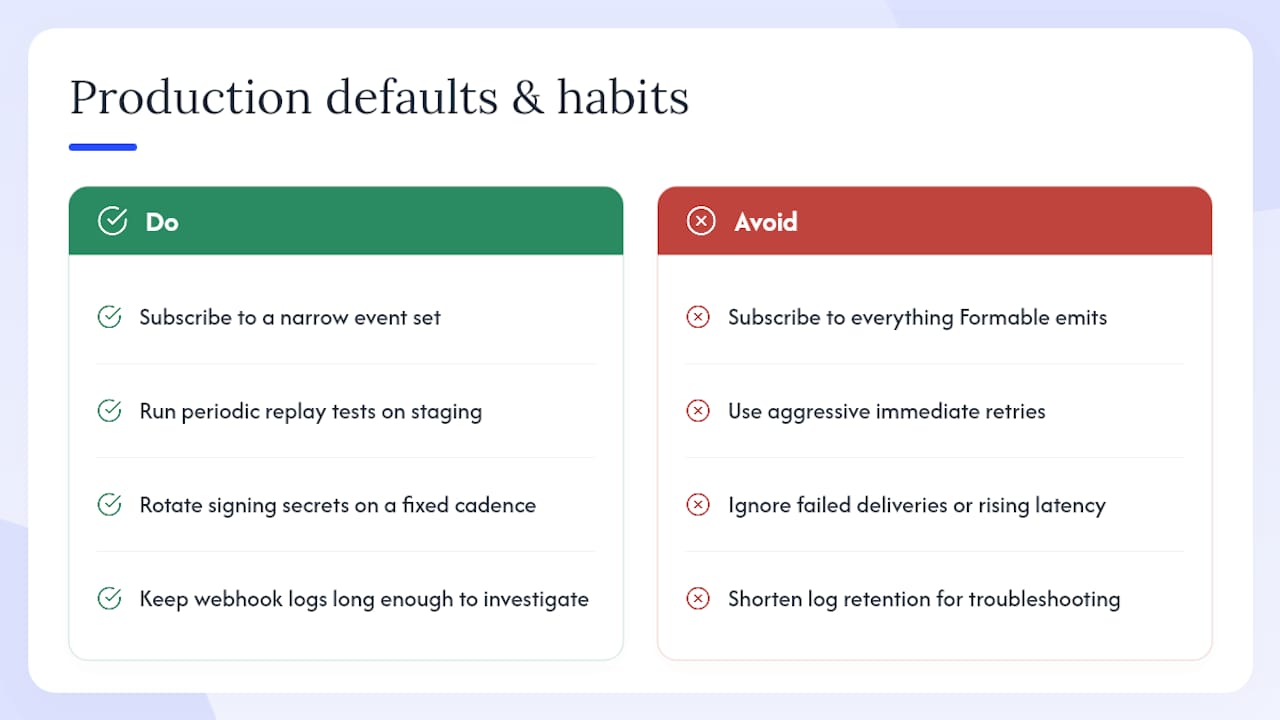
Formable's own webhook infrastructure runs on the same principles this guide argues for, applied at scale. Default retry windows favor a handful of attempts with backoff rather than aggressive immediate retries, and webhook health gets monitored by tracking failed deliveries and rising latency on receiving endpoints.
Teams handling high volumes of signature events do better subscribing to a narrow set of events instead of everything Formable can emit. Beyond that, three habits pay off consistently: run periodic replay tests against a staging endpoint, rotate signing secrets on a fixed cadence, and keep webhook logs long enough to investigate an issue reported days after the fact.
— Alex
Try Formable's embedded e-signing API and sandbox
Formable gives you the full webhook convention described here out of the box, with signature completed and final document events, HMAC verification, and dashboard replay built into the developer experience rather than bolted on later. If you're currently stitching together a signing flow from a general-purpose API and separate contract tooling, Formable's embedded e-signing API collapses that into one integration with documented event schemas and a webhook convention you can build against immediately.

Formable runs a free tier for individual developers and small integrations, with usage-based pricing once your API and e-signature volume grows. Create a developer sandbox account, register a test webhook endpoint, and send your first SignatureRequestUrl through Formable's contract platform to see the event flow end to end before you commit to production traffic.
Sources
For code samples, schema definitions, and sandbox setup, start with Formable's developer documentation and the embedded e-signing API page. For a broader implementation reference, the e-signature webhook guide covers lifecycle and verification in more depth, and Adobe's webhook events file is a useful example of how another major provider names and structures its events. For dashboard replay behavior across providers, see Legalesign's webhook documentation.
FAQ
What is a webhook signature?
A webhook signature is an HMAC hash, usually SHA-256, that the provider computes over the raw request body using a shared secret. You recompute that hash on your side and compare it before trusting the payload, which confirms the request actually came from the provider and wasn't tampered with in transit.
Is there an API available for digital signatures?
Yes. Most modern eSignature platforms, including Formable, expose a REST API for creating signature requests, embedding signing flows, and registering webhooks for real-time event delivery rather than requiring you to poll for status changes.
Is there a free eSignature API available?
Formable offers a free tier suited to individual developers and low-volume integrations, moving to usage-based pricing as your signature and API call volume increases, so you can build and test a full webhook integration before paying anything.
How do I choose the best signature API for my integration?
Look past marketing claims and check for documented webhook event types, HMAC or Svix-style signature verification, clear retry and timeout behavior, and a sandbox environment where you can test the full flow, including PDF retrieval, before going live.